Configuration
Set the way you want the editor to open once, then launch it with a file or project path. The shared Turbo Haskell configuration file is $XDG_CONFIG_HOME/thc/config.toml, or ~/.config/thc/config.toml when XDG_CONFIG_HOME is unset.
[editor.defaults]
backend = "metal"
scale = 1.5
screenMode = 259
columns = 120
rows = 50
appearance = "dark"
wordStar = false
macKeySymbols = false
blinkCursor = true
crtFilter = true
pixelateUnicode = true
bufferView = "current"
materialIcons = false
streamerMode = false
Use terminal, auto, metal, vulkan, or web for the display backend. remote serves the protocol over standard input/output. Scale runs from 1 to 8 in eighth steps. Screen mode 3 defaults to 80×25; 259 defaults to 80×50. Explicit columns and rows override those dimensions. The terminal takes its size from the terminal window.
In text mode, macKeySymbols = true uses ⌃, ⌥, ⇧ and ⌘ in key labels. You can also set Options > Preferences > Mac key symbols, which saves the choice to the global configuration. ⌥ and ⌘ reserve two character cells; the terminal cursor is repositioned after each glyph even if its font draws it narrower. This changes labels, not bindings: terminal shortcuts still use Control/Alt, and Command remains owned by your terminal application. Native Mac windows and Mac browsers use symbol labels automatically.
Command-line options override environment variables, which override project defaults, which override global defaults. For example, THC_EDIT_BACKEND=web overrides backend = "metal", and --terminal overrides both. --mode selects its usual dimensions unless --size is also supplied. --no-crt, --classic-icons, --standard-keys, --no-blink-cursor and --no-pixelate-unicode override enabled defaults.
bufferView accepts current, changes, only-changes, or side-by-side. The radio controls in the Window menu save this default for newly opened buffers.
Startup defaults apply when a session is created. Resuming keeps that session's editing state; the frontend can still use your chosen backend and scale. To change a running session, use Options > Preferences. An agent can read and update non-agent settings through editor_settings; its defaults object updates the startup section without changing the current session.
Project configuration
Put thc.toml in the project root. It uses the same namespaces as the global configuration and can live in version control:
[editor.defaults]
screenMode = 259
columns = 120
appearance = "dark"

[editor.agent]
context = """
This package implements the editor. Keep the public API small.
Run the editor checks for changes to input, layout or rendering.
"""
Discovery starts at the named file's directory, the named directory, or the current directory when no path is given. The nearest thc.toml wins. Without one, the search stops at a Cabal package, cabal.project, or Git root; the UI creates thc.toml there. Without a project marker, it uses the starting directory. Only one project file is loaded; parent projects are not recursively merged.
[editor.defaults] is merged key by key over global defaults. Omitted values inherit; project false overrides global true. Project defaults apply at startup. The agent's editor_settings.defaults writer still edits the global file; it does not rewrite the project file.
Keybindings
Replace commands through the global configuration or a project's thc.toml. Profiles are terminal, graphical (Linux/Windows native and browser), and macos (macOS native and browser). Every profile is prepared on startup/reload; changing attachments selects the focused profile and context immediately:
[editor.keybindings.terminal.source]
"hide.file.save" = ["Ctrl+Shift+S"]
"hide.file.open" = []

[editor.keybindings.terminal.sidebar]
"hide.sidebar.expand" = ["Ctrl+E"]
"hide.sidebar.down" = []

[editor.keybindings.terminal.conversation]
"hide.edit.copy" = ["Ctrl+Shift+Y"]

[editor.keybindings.terminal.terminal]
"hide.terminal.stop" = ["Alt+F11"]

[editor.keybindings.macos.source]
"hide.edit.copy" = ["Cmd+Shift+J"]
"hide.edit.paste" = ["Cmd+Shift+K"]

[editor.keybindings.graphical.source]
"hide.file.save" = ["Ctrl+Shift+S"]
Contexts are source, wordstar, dialog, sidebar, conversation, messages, debugger and terminal. A global table supplies explicitly configured commands to all of those contexts where the command and chord belong to the input owner; a context entry takes precedence over the same global command. Dialogs inherit only their editing/search actions, and omit chords owned by dialog controls. Within each table a project entry replaces the global configuration's entry. An override replaces all shortcuts for its command; [] explicitly unbinds it. Omitted commands retain their inherited defaults. Menu, context-menu and command status labels show the focused context's effective binding, including an empty label for an unbound command. Commands remain available through their menus.
Source, conversation and debugger panes retain the standard command defaults. When WordStar is enabled for a text source, its wordstar table owns named commands such as Save, Open and Undo. Their function-key and existing named command defaults remain; other Ctrl character keys stay inactive unless assigned. Ctrl+E/S/D/X movement, Ctrl+A/F word movement, Ctrl+Y line deletion, and Ctrl+K/Ctrl+Q prefix/block grammar stay fixed. Overrides using those owned chords fail validation. Global chords owned by this grammar are omitted from its inherited map, preserving their use in other contexts. Prefix command steps remain available even when the same named command is rebound or unbound in the table; customizable prefix/movement grammar remains open in #3. Hex buffers use source. For example, [editor.keybindings.terminal.wordstar] with "hide.file.save" = ["Ctrl+Shift+J"] replaces F2 for WordStar sources only. The sidebar additionally binds Up/Down and PageUp/PageDown to row movement, Enter to activate, Right to expand, Left to collapse, and F6 to return to source. Messages uses its own row/page movement, Enter to jump to source, and F6 to leave. PTY windows retain window/build shortcuts while ordinary keys, including Ctrl+C, Ctrl+Q and Ctrl+S, reach the process. Global Ctrl character chords are omitted from PTY maps, so a global Save override such as Ctrl+Shift+S still applies to the other contexts. A mixed global list retains its transferable PTY chords. Explicit terminal-context Ctrl character assignments fail validation.
Use canonical IDs in the command catalog, with Ctrl, Alt, Shift and graphical Cmd modifiers and names such as F2, Insert, Delete, Left and PageDown. Unknown contexts or commands, malformed chords and conflicts stop configuration loading. To assign an occupied key, remove or replace its previous command's binding too. Ordinary text, menu mnemonics, window navigation, completion controls, Escape, F10 and Ctrl+] remain reserved. Conversation Enter retains the configured Query/Steer and code-block submission behavior. Dialog dialog tables accept only Copy, Cut, Paste, Select all, Undo, Redo, Find and Replace canonical command IDs. Editing actions apply to an editable TextArea; Find/Replace apply to a search dialog. Plain single-line Input fields retain their existing text/editing controls and Ctrl/Alt button mnemonics. Defaults are Ctrl+C/X/V/A, Ctrl+Shift+C/X/V/A, Ctrl+Z Undo, Ctrl+Y and Ctrl+Shift+Z Redo, Ctrl+F Find, and Ctrl+H/R Replace, with the macOS Cmd counterparts. Only permitted actions are projected to native/browser accelerators for the current field. For example:
[editor.keybindings.macos.dialog]
"hide.edit.copy" = ["Cmd+Shift+J"]
"hide.edit.paste" = ["Cmd+Shift+K"]
Dialog editing remaps operate on that field's buffer and undo history. Enter, Escape, Tab, Ctrl+Tab search switching, Ctrl+U input clearing, text, button mnemonics and permission decisions retain their control ownership. Sensitive agent/approval controls keep their human authority regardless of a remap. Source accelerators are inactive while a modal owns input.
Choose Options > Reload keybindings after editing TOML. Loading and validation run on the session worker; the existing map stays active until a valid replacement is ready. A failed reload reports its error and keeps that map. Changing the working directory while loading requires another reload. Recovery loads current configuration; attaching to a running session retains its map.
Options > Inspect keybindings opens a read-only buffer containing every command's effective chords for the context focused when inspection was requested. Unbound commands appear as []. Both operations have canonical IDs hide.bindings.reload and hide.bindings.inspect and can themselves be bound. Agents cannot request a reload. Put remote project settings on the remote host. Native menus display their effective accelerator with explicit modifiers; additional chords use the same input resolver. Copy/cut/paste remaps use the system clipboard. Browser keyboard clipboard defaults use browser clipboard events only while their configured action still matches. Browser Edit-menu clipboard actions remain semantic commands. Remapped clipboard requests run after the host resolves their command, so they may require the visible clipboard button when browser permissions or user activation prevent access. Browser/OS reserved shortcuts (such as Reload and macOS Hide) cannot be intercepted reliably. Plain macOS Option characters retain composed text input and cannot be assigned to commands; Cmd+Alt chords remain distinct. Local graphical scale keys remain reserved.
WordStar movement/prefix/block grammar and dialog-navigation customization remain subsequent stages of configurable keybindings.
Environment
Options > Environment… lists the running editor's environment. Select a name and Edit, or choose New. Set its value and scope, then Apply; Unset variable removes it from the environment of future processes.
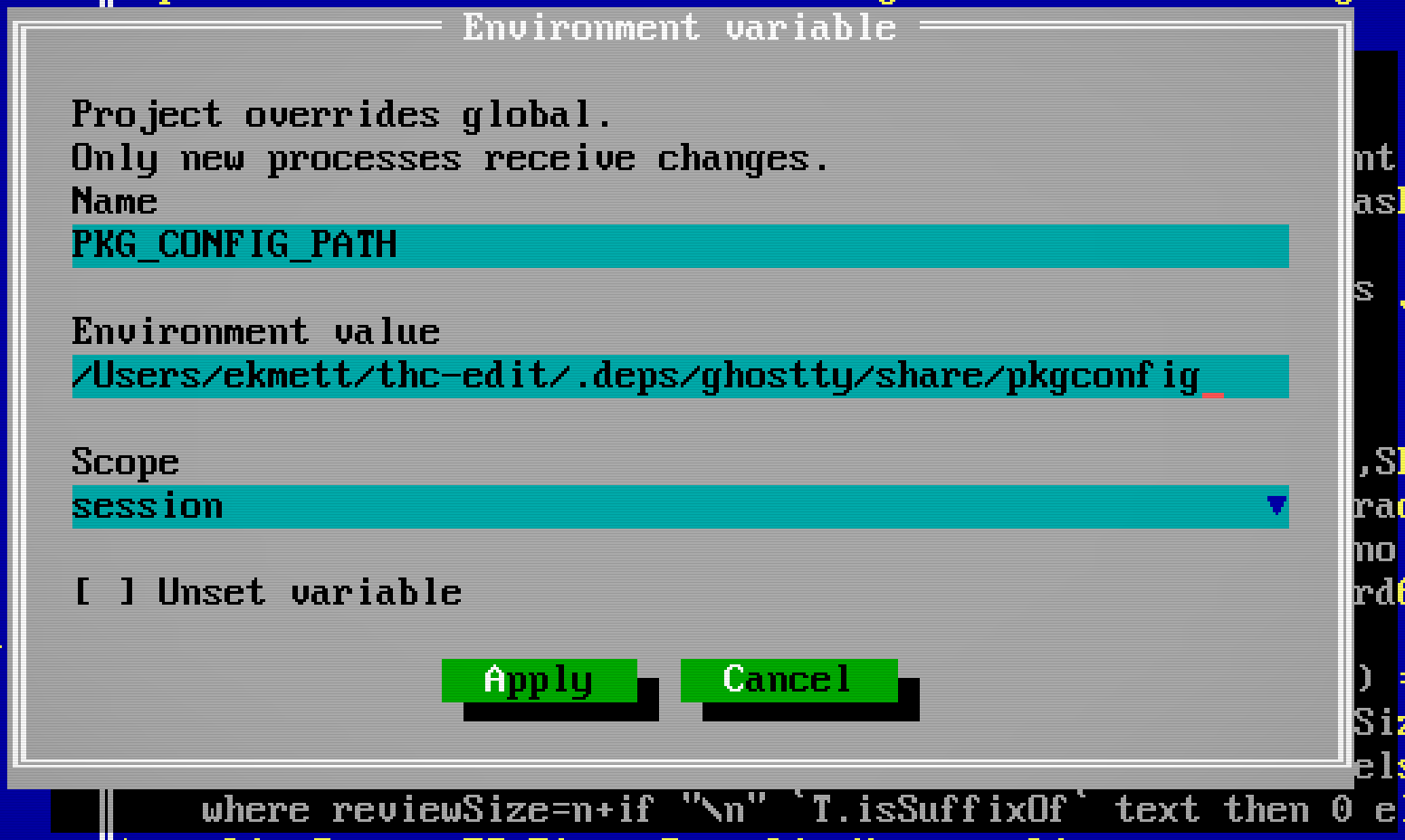
- Session applies immediately and lasts until the editor process exits.
- Project saves in the project's
thc.toml. - Global saves in the shared
thc/config.toml.
[editor.environment]
PKG_CONFIG_PATH = "/path/to/library/share/pkgconfig"
OLD_BUILD_OPTION = false
Strings are literal values: $PATH, ${NAME} and ~ are not expanded. Read the current value before extending a search path; use : on macOS/Linux and ; on Windows. false explicitly unsets a variable. On startup, project entries override global entries, which override the inherited shell environment. Saving a global entry respects an existing project override. Session changes can temporarily override either.
New builds, terminals, debugger adapters and agent providers inherit the updated environment. Already running processes retain their old values: start a new job or reconnect the affected provider. There is no need to restart the editor. Agent-provider-specific environment overrides still take precedence.
Agents use environment_get and environment_set, controlled individually by Options > Agent Permissions. Credential values are redacted in tool results, and agents cannot write credential variables. Editor session/transport variables, configuration locations and loader overrides are protected from changes through this facility. Streamer mode masks the value field. Do not commit secrets in project configuration; session scope avoids writing values to disk.
For dependencies shared by the project, prefer a checked-in build configuration. This editor's cabal.project already discovers Ghostty installed under .deps/ghostty; see Installation.
Agent context
Use [editor.agent].context in either file for guidance you want supplied to conversation agents. Global text comes first, then project text. The project text adds to the global context; an empty project string adds nothing.
Options > Agent Context selects Global or Project, then Edit opens the TOML in a normal editor window with save, undo and multiline editing. Use triple-quoted TOML strings as above. Save with F2 before sending your next query or steering message. Guidance is limited to 16,384 characters per scope.
The first query after connecting or resuming supplies the skill catalog and current context. Later queries and steering messages resend context only when its saved value changes, including when it is cleared. Queued queries use the context current when dispatched. Editing context does not submit a query or interrupt a running response by itself. Invalid configuration stops submission and retains the query for repair.
Agents can read the effective text and its source paths through agent_settings. They cannot edit this configuration through file or input tools. Context is sent to the provider, so use it for guidance rather than credentials. Tool permissions remain global: a project file cannot enable tools or override Agent Permissions.
Agent limits
Set the maximum active agents in the session and the maximum direct subagents per agent in the global configuration:
[editor.agents]
max_agents = 8
max_subagents = 4
These are the defaults. max_agents accepts integers from 1 to 64 and includes the main human-managed agent. max_subagents accepts integers from 0 to 64; zero prevents agents from spawning direct subagents. Both limits must allow a spawn: a free child slot does not bypass the session total.
The discovered project thc.toml may lower either global ceiling. Omitted fields inherit the global value; larger project values do not raise it. Limits are checked for future spawns. Lowering a limit does not kill agents already running, but further spawns are blocked until both limits permit them. Invalid types, out-of-range values or malformed configuration block new spawns until repaired. Existing configuration writers preserve these settings and unknown sections; there is no agent tool for changing the limits. [editor.agent] remains the separate namespace for conversation context.
Streamer mode
Turn on Options > Preferences > Streamer mode before sharing your screen, or start with --streamer. Sensitive input values and session keys are masked on every frontend; their stored values are unchanged. --no-streamer turns it off. This is a user-controlled preference: agents can read its state but cannot change it through input or settings tools.
Views supplied to agents always redact sensitive values, whether or not Streamer mode is on. Source files are not scanned for secrets by this display option.
Agent Permissions
Options > Agent Permissions saves each tool's Enable, Prompt or Disable policy:
[editor.mcp.permissions]
read_buffer = "enable"
buffer_apply_diff = "prompt"
terminal_start = "disable"
Read-only tools default to Enable; other tools default to Prompt. Omitted tools retain that default. See session tools for the available services.
The editor preserves unrelated settings and comments when saving its own entries. Additional compiler sections can share this file as they are introduced.
Autocomplete
Completion settings are independent of the main conversation. Choose them in Options > Autocomplete, or set global defaults and project overrides:
[editor.autocomplete]
provider = "acp" # off, acp, or copilot
executable = "codex-acp"
arguments = "[]" # JSON array of arguments
model = ""
effort = ""
copilotExecutable = "copilot-language-server"
copilotArguments = '["--stdio"]'
debug = false
An empty model or effort uses the ACP provider's default. Set debug = true to show the completion conversation in the bottom panel; ACP accepts intent hints there. Completion stays off until a provider is selected. The Options dialog updates the project table if it already exists, otherwise global settings. A project value in thc.toml takes precedence. Agents cannot change these settings or complete their own authentication.